FG Electrical – Fuel Watch
Put Fuel Watch on your home screen
Put Fuel Watch on your home screen
1. Open Fuel Watch
Scan this code with your phone camera, or open the address:
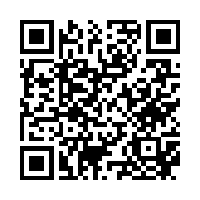 https://fgserver101.tailae7d64.ts.net
Open Fuel Watch now
2. Add it to your home screen
Android (Chrome):
- With Fuel Watch open, tap the ⋮ menu (top right).
- Tap Add to Home screen (or Install app), then Install.
iPhone / iPad (Safari):
- With Fuel Watch open, tap the Share button (square with an arrow).
- Scroll down and tap Add to Home Screen, then Add.
Windows PC / laptop (Chrome or Edge):
- With Fuel Watch open, click the small install icon at the right end of the address bar (a monitor with a down-arrow).
- Click Install. Fuel Watch appears in the Start menu and can be pinned to the taskbar.
3. Sign in
Open the new icon and sign in with the username and password the office gave you. Fuel Watch works from anywhere with internet – no Tailscale or VPN needed.
Problems? Contact the FG Electrical office.